Find out more with SciForce free whitepaper
As the demand for video content automation increased, the client's manual video processing system struggled to keep up. Key challenges included:
1. Continuous Server Operation
The platform's servers were running around the clock, even when no videos were being processed, leading to inefficient resource usage instead of cost-optimized video processing with on-demand cloud resources. This meant resources were being used unnecessarily during quiet periods, leading to higher cloud costs and wasted energy — a common issue in media platforms without serverless architecture for reducing cloud costs.
2. Handling Video Spikes
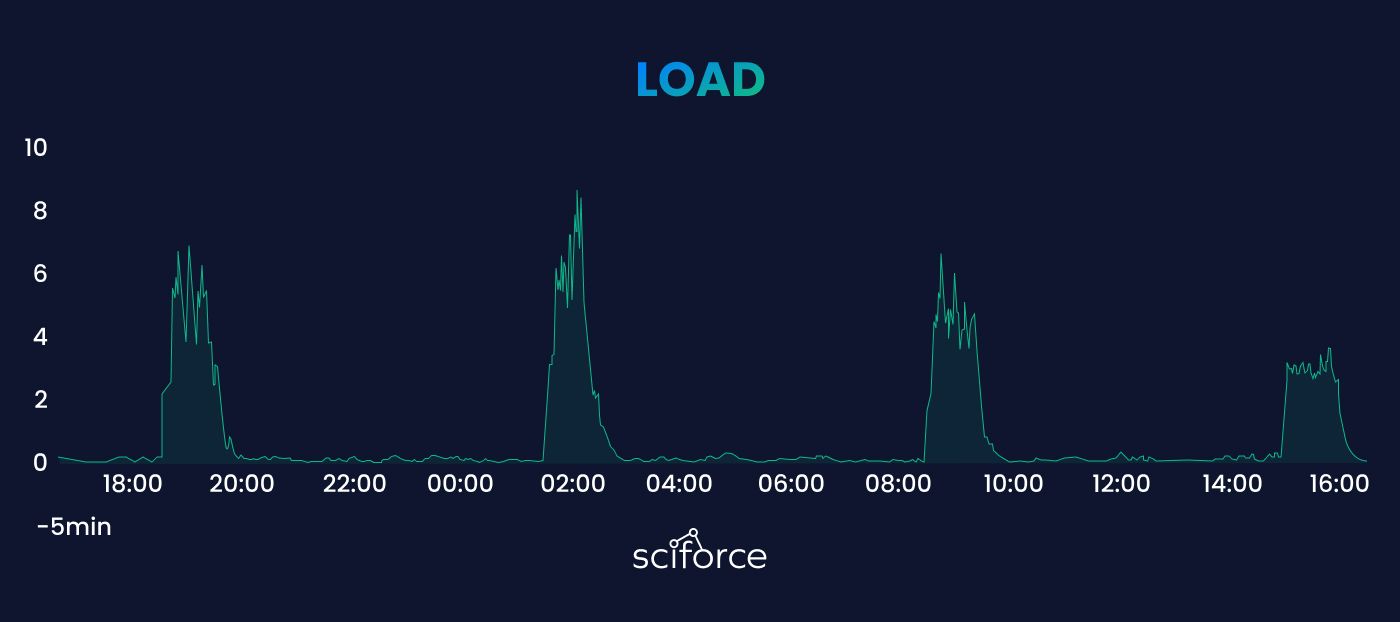
When many video files were uploaded at once, especially during busy periods like product launches or events, the system couldn’t process them fast enough. This led to delays, with files waiting in line for conversion, causing clients to experience slower video processing and content distribution.
3. Resource Wastage
During slow periods, like weekends or late nights, servers ran without being fully used, wasting resources like CPU and memory. Despite little activity, they still consumed power and cloud resources, driving up costs. During busy times, the same servers were overloaded, causing slowdowns and delays. This imbalance made it difficult to manage resources efficiently.
4. High Maintenance Burden
The system needed constant manual monitoring, with staff having to check video processing, restart failed tasks, and ensure smooth operation. For example, during busy times, staff had to step in to fix errors and clear processing delays. This regular manual involvement increased labor costs and slowed down the workflow, as the system couldn’t run efficiently without human intervention.
To address the client’s challenges, we implemented an AI-powered automated video processing pipeline with several key components:
1) Python automation in AWS:
A custom Python-based dispatcher was developed to manage incoming video files, enabling event-driven video processing using containers and Python. It detected new uploads, categorized the videos, and automatically triggered the appropriate processors to handle tasks like conversion and optimization. This eliminated the need for manual intervention in the upload process.
2) Amazon ECS Cluster (Elastic Container Services):
We used Amazon ECS to create a scalable video infrastructure, enabling serverless video processing with AWS Fargate and ECS that dynamically scales based on demand. By using containerized computing resources, the system could automatically adjust resource allocation, ensuring that video processing tasks were handled efficiently, regardless of volume spikes.
3) Digital Media Platform Optimization:
The entire video processing workflow was automated. Containers were only started when needed, and once processing was completed, the resources were automatically released — enabling cost-optimized video processing with on-demand cloud resources. This ensured that computational resources were only consumed when real-time media optimization tasks were present, significantly reducing operational costs.
4) AWS Fargate vs. EC2 Virtual Machines:
Initially, the option of using EC2 virtual machines for container management was considered. However, AWS Fargate was chosen due to its execution model, which allowed for better cost-effectiveness and scalability. With Fargate, the platform operated with serverless DevOps architecture, further streamlining resource management and improving system flexibility. ECS supports both paths — our sports medicine CV platform took the EC2-backed route instead, where IaC and rolling deployments mattered more than serverless scaling.
Automated Video Processing:
The platform automatically detects when video files are uploaded and processes them without manual intervention. This ensures efficient handling of video tasks regardless of file size or timing.
Python-Based Dispatcher:
A custom-built Python dispatcher manages incoming video files and triggers the appropriate processors based on the type of content. This ensures the right processing actions are taken for each video.
Resource Allocation Automation:
Computational resources are automatically allocated and released. The system only uses resources when needed, reducing operational costs by preventing unnecessary server use during idle periods.
Error Handling and Restart:
If a processing job fails, the system automatically detects the failure, restarts the task, and logs the issue. This minimizes manual troubleshooting and ensures smoother processing.
1. System Architecture Design:
2. Python-Based Dispatcher Development:
The dispatcher was built to act as the central controller for processing incoming video files. It was designed to:
3. Containerization of Video Processing:
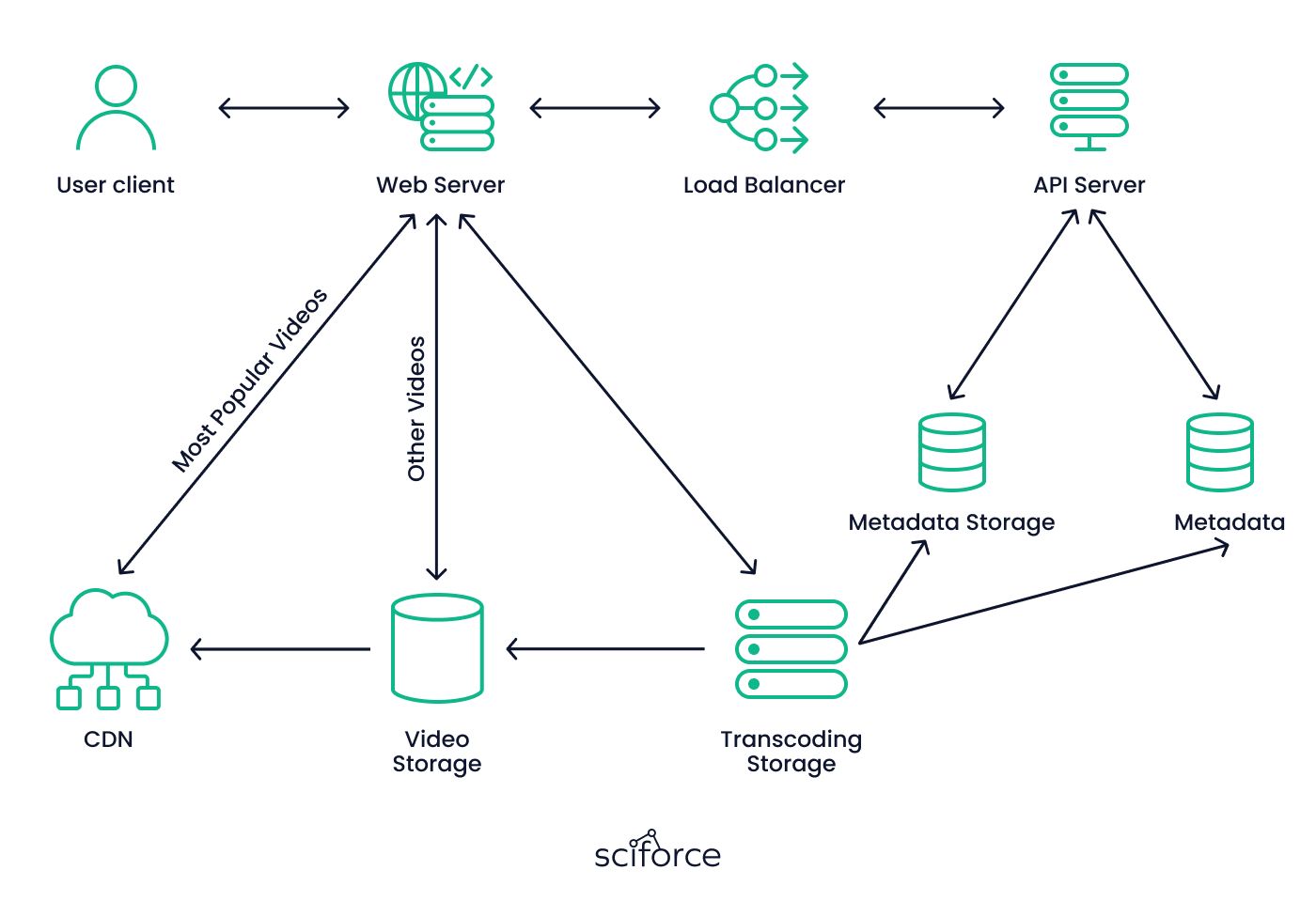
The video processing pipeline was broken down into modular components and containerized using Docker. Each container was set up to handle a specific processing task:
4. Setting up Amazon ECS and AWS Fargate:
5. Database and Logging Setup:
6. Load Testing and Optimization:
7. Deployment with CI/CD Pipeline:
The implementation of the automated video processing solution delivered significant improvements across multiple areas, addressing the client's challenges effectively. Key results included:
The implementation of the automated video processing solution delivered significant improvements across multiple areas, addressing the client's challenges effectively. Key results included:
1. Increased Efficiency
2. Cost Reduction
3. Improved Scalability
4. Enhanced Reliability
5. Reduced Maintenance Effort