Find out more with SciForce free whitepaper
1. Launching in the cloud
The product had to be deployed in AWS from scratch, requiring a secure network design that separated internal components from publicly accessible ones. The infrastructure needed to protect sensitive data while keeping the application available to end users.
2. Reliable delivery process
The client required a way to release new versions of the backend API quickly and consistently. Manual builds and deployments would have slowed down delivery and introduced errors, so a CI/CD pipeline for containerized applications on AWS was needed to handle the process end to end.
3. Multi-environment support
Without separate dev and prod environments on AWS using IaC, testing new features risked impacting the stability of the live production system.
4. Infrastructure consistency
Without infrastructure as code for ECS using AWS CDK, reproducing identical environments risked configuration drift, inconsistent deployments, and harder troubleshooting across Dev and Prod. Manual setup would have risked configuration drift and made scaling or troubleshooting more difficult, so a code-based approach was required.
5. Frontend hosting and availability
The frontend needed to be globally accessible, provide fast response times for users in different regions, and support frequent updates without service interruptions.
6. Cost and scalability considerations
The platform had to handle growth in user demand without requiring major redesigns, while keeping costs aligned with actual usage rather than fixed capacity.
1) Cloud Infrastructure Setup
A secure network was built in AWS VPC, divided into public and private subnets to clearly separate internal and external resources. A Load Balancer managed all incoming traffic from the internet, distributing requests across application services inside the VPC to ensure both reliability and high availability.
2) Application Deployment
The backend API was packaged as Docker containers and deployed on Amazon ECS — the same cloud-native deployment pattern we used to scale a real-time computer vision system for hospitality across multiple locations. Each service ran as ECS tasks behind the load balancer, with rolling updates and health checks ensuring containers were restarted automatically on failure.
3) Container Registry & CI/CD
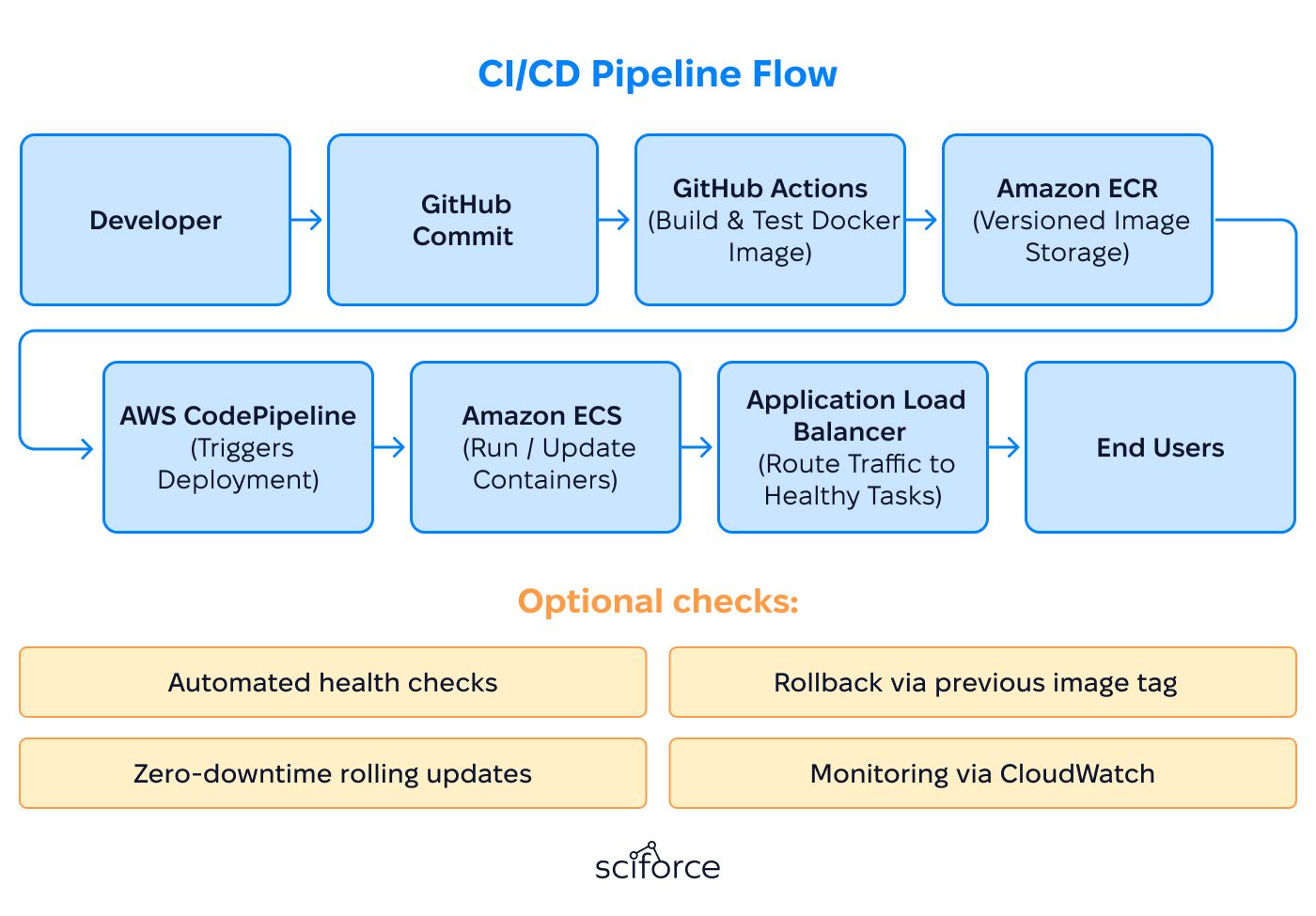
Docker images were versioned and stored in Amazon ECR. GitHub Actions built images on hosted runners, authenticated with stored secrets, and pushed them to ECR. AWS CodePipeline monitored the registry for new tags and deployed them to ECS, using rolling updates and health checks to avoid downtime. The AI tooling that helps developers build and maintain these kinds of pipelines is evolving quickly — the coding copilots article covers how AWS CodeWhisperer and similar tools are accelerating cloud-native development in 2025.
4) Data Layer
Amazon RDS was provisioned in private subnets with no public endpoints. It was configured for multi-AZ deployment and automated backups, with storage that could scale on demand. ECS services accessed the database securely within the VPC.
5) Frontend Delivery
The static frontend was hosted on Amazon S3 and distributed through CloudFront. The CDN was configured with HTTPS, caching policies, and regional edge locations. Build pipelines uploaded new artifacts to S3 and triggered cache invalidations so users received the latest version globally.
6) Infrastructure as Code
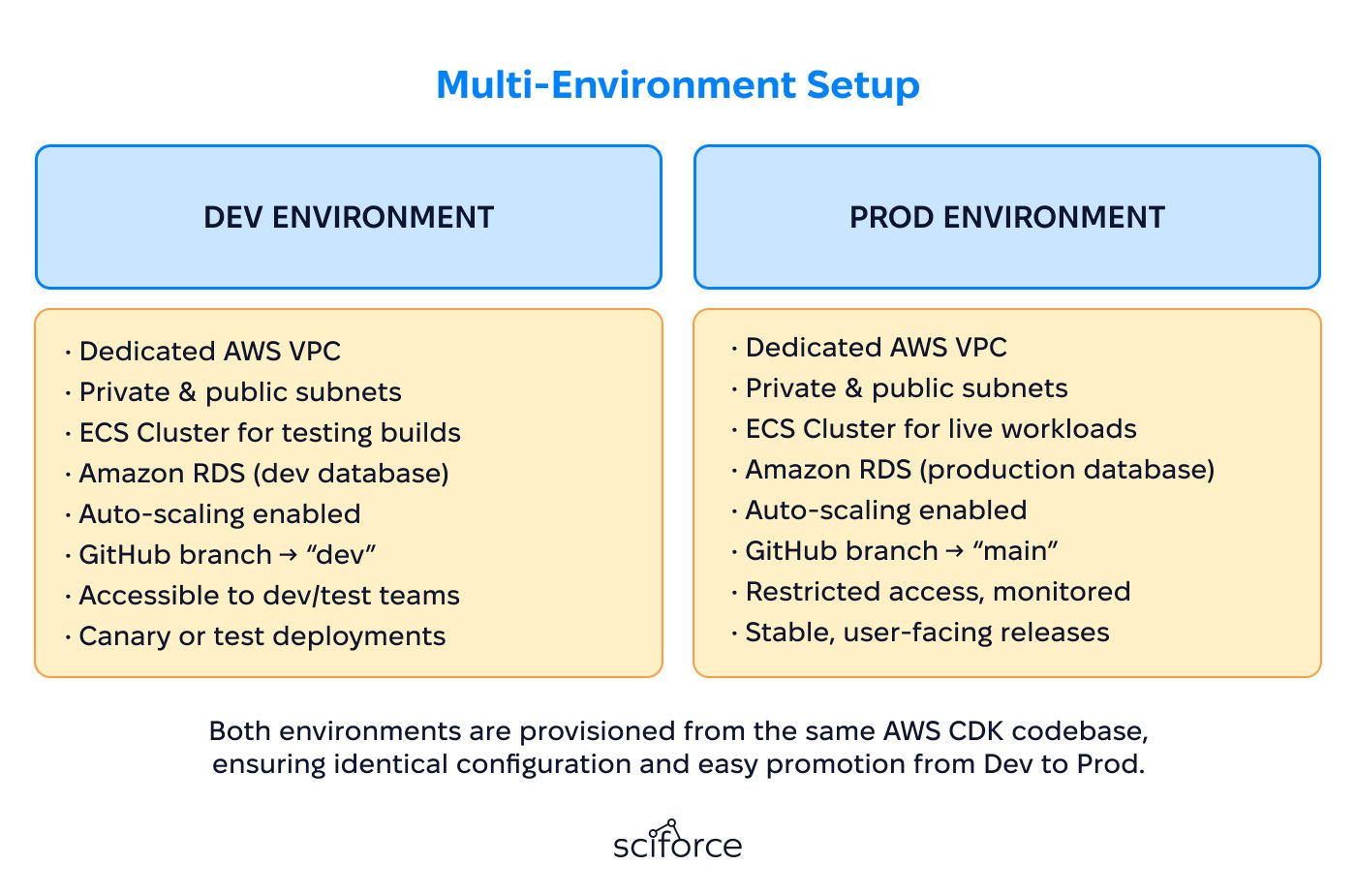
AWS CDK was used to define networking, compute, storage, and IAM. Dev and Prod stacks were generated from the same codebase, version-controlled in Git, so changes could be reviewed and deployed consistently.
7) Security & Access
IAM roles and policies were defined with least-privilege access. A dedicated IAM user was created for CI/CD deployments, restricted to the permissions required for pushing images to ECR and updating ECS services.
Automated CI/CD pipeline
Integrated with GitHub Actions, Amazon ECR, and AWS CodePipeline to provide continuous builds, versioned container storage, and automated ECS deployments with rolling updates.
Environment isolation
Fully independent Dev and Prod environments allowed new features to be tested end-to-end without risking production stability.
Versioned deployments
Every container image was tagged with the code commit it came from, giving the team a clear history of changes and the option to roll back to any earlier version quickly.
Service resilience
Backend services were deployed on ECS and routed through an Application Load Balancer. Health checks monitored each task, and rolling updates replaced old tasks only after new ones were verified.
Secure infrastructure
Databases were kept in private subnets with no public access, ECS tasks could connect only inside the VPC, and IAM roles were limited to the permissions they needed. This reduced external exposure and kept access tightly controlled.
Global frontend delivery
Static files were hosted in Amazon S3 and served through CloudFront with HTTPS, regional edge caching, and automatic cache refresh.
1. Branching & Environment Strategy
The workflow started with a clear Git branching model. Developers worked in feature branches and merged into the dev branch for staging, while the main branch was reserved for production-ready code. Each branch mapped directly to its own AWS environment — Dev or Prod — which ran in isolated VPCs with dedicated ECS clusters and databases. This separation reduced risk, since experiments in Dev could fail safely without touching production systems.
2. Build & Containerization
Every commit to GitHub automatically triggered a build through GitHub Actions. The CI workflow ran on GitHub’s managed runners, eliminating the need for custom build servers.
This made sure every release artifact was consistent, traceable, and reproducible at any point in time.
3. Artifact Storage & Version Control
Amazon ECR acted as the central registry for Docker images. Each version was retained with immutable tags, giving developers the ability to:
This version control of artifacts complemented Git’s version control of source code, tying deployments directly to their code history.
4. Deployment Automation with CodePipeline
To address uncertainties around how to set up continuous deployment on AWS ECS, the continuous delivery step was implemented entirely using AWS-native services. CodePipeline monitored ECR for new images. As soon as an image was published:

5. Verification & Monitoring
Deployments were followed by automated checks and monitoring:
6. Rollback & Recovery
If a release introduced issues, rollback was straightforward. Since every Docker image was stored in ECR with commit tags, the team could redeploy any earlier version by selecting its tag. This reduced mean time to recovery from hours to just a few minutes, minimizing user impact.
7. Infrastructure Lifecycle Management
All resources — from networking and IAM policies to compute and databases — were defined in AWS CDK, complementing our broader work on unifying DevOps workflows across AWS, GCP, and Azure for teams managing multi-cloud infrastructure. This approach provided:
Compared to Terraform, CDK gave the team more flexibility by using high-level programming constructs like loops, objects, and conditional logic in infrastructure definitions.
Faster delivery Automated CI/CD reduced release time by ~80% (from several hours to under 30 minutes).
Improved security Private subnets, IAM least-privilege roles, and managed RDS cut external exposure by 100% (no direct internet access to critical systems).
Higher reliability Rolling deployments and health checks maintained 99.95%+ uptime, with rollback options reducing recovery time to under 5 minutes.
Better user experience CDN and AppSync improved global response times by 30–40%, ensuring faster page loads and smoother API calls.
Optimized costs Serverless, pay-per-use components lowered idle infrastructure expenses by 25–30%, while retaining unlimited scalability for traffic spikes.