Find out more with SciForce free whitepaper
1. Multi-cloud differences
Azure, Google Cloud, and AWS each use different APIs, resource hierarchies, and provisioning models. For example, setting up a Kubernetes cluster in Azure requires a different process and parameters than in Google Cloud. The challenge was how to abstract cloud differences between Azure GCP and AWS behind one consistent workflow.
2. Cross-cloud networking
Each provider has its own approach to virtual networks, load balancers, and security groups. Normalizing these differences while ensuring secure communication across environments was critical to prevent fragmentation.
3. Access control and credentials
Each provider has unique authentication flows (Azure Active Directory, Google IAM, AWS IAM). During onboarding, clients had to supply credentials in different formats, and the team needed to standardize how these were stored, validated, and used to provision resources securely.
4. Multi-tenant RBAC
Different clients and departments required strict separation of roles and permissions. Designing fine-grained RBAC that works across providers while supporting tenant isolation was a key challenge.
5. Unified infrastructure configuration
Clients were expected to define their infrastructure in code. The difficulty was ensuring that a single schema could cover multiple providers, for instance, describing a virtual machine or database in a way that could be translated into both Azure and Google Cloud without manual adjustments.
6. Cross-cloud testing
Schemas and automation components had to be validated in real environments. Running the same configuration across Azure and GCP often exposed hidden differences in APIs, quotas, and defaults that required careful handling.
7. Kubernetes components development
Code definitions proceed automatically and trigger the correct actions in the target cloud. This included provisioning new Kubernetes clusters in a client’s own Azure or GCP account, updating resources when configs changed, and cleaning them up if they were deleted from the repo.
8. State management with GitOps
The platform had to enforce the “source of truth” defined in Git. If a user manually modified a cluster in Azure, the system needed to detect this drift and restore it to the state described in the repository. Maintaining that feedback loop was essential for stability.
9. Automation of onboarding
Previously, DevOps engineers had to manually prepare accounts, permissions, and starter infrastructure for each client. The team developed automation scripts to capture credentials and bootstrap initial configurations in Azure, significantly reducing setup time and errors.
1) Unified workflow design
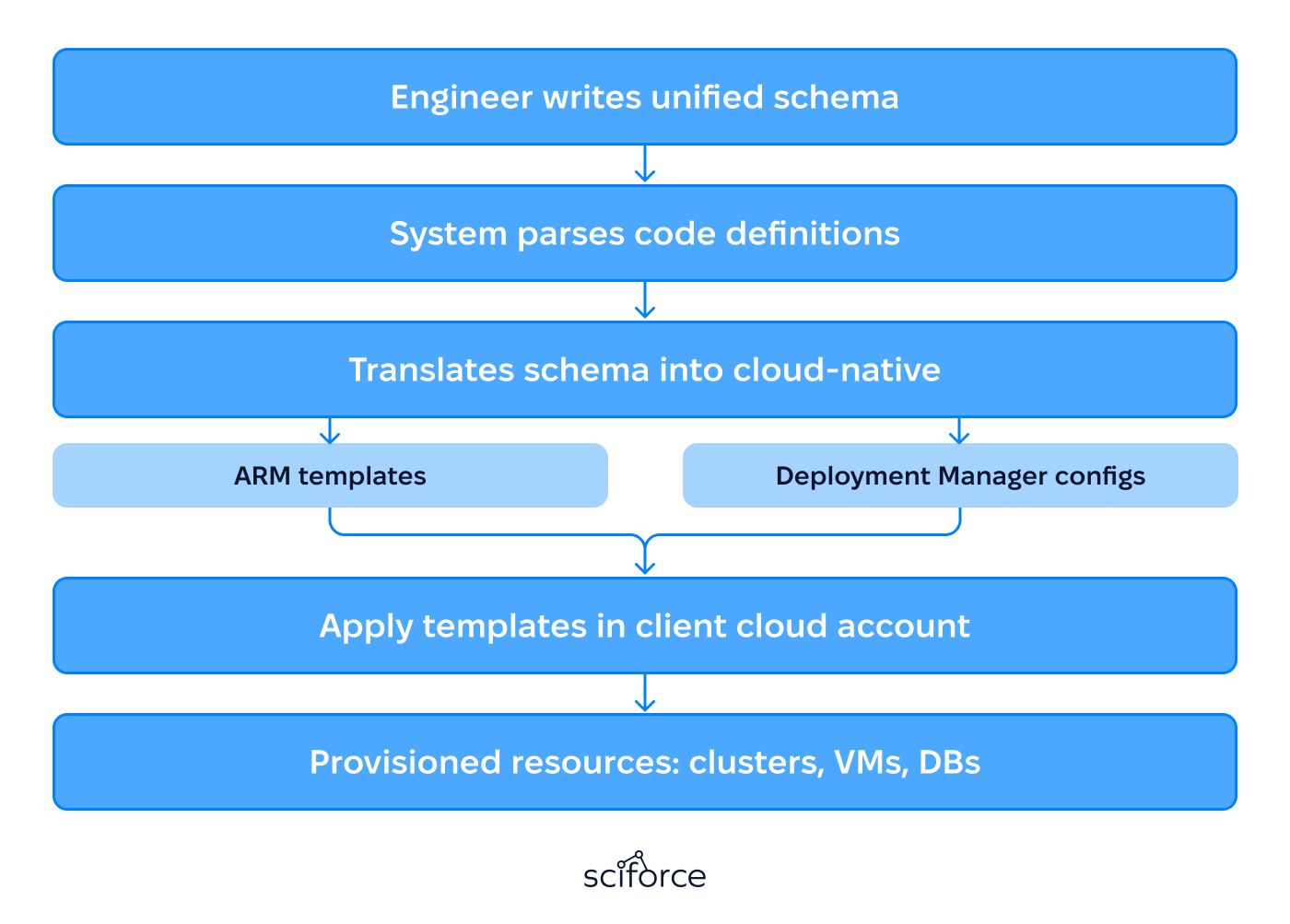
A provisioning process was created so that engineers could describe infrastructure, such as Kubernetes clusters, virtual machines, or databases using a single standardized schema. Behind the scenes, the system translates this schema into the native language of each provider.
2) Kubernetes-oriented architecture
The system introduced modular orchestration components to add new custom resource types (CRDs) to the cluster. For example, a platform extension could define a resource like AzureKubernetesCluster. When this resource is applied, it connects to the client’s cloud account, creates the cluster, sets up access, and manages it through its full lifecycle, including updates and deletion.
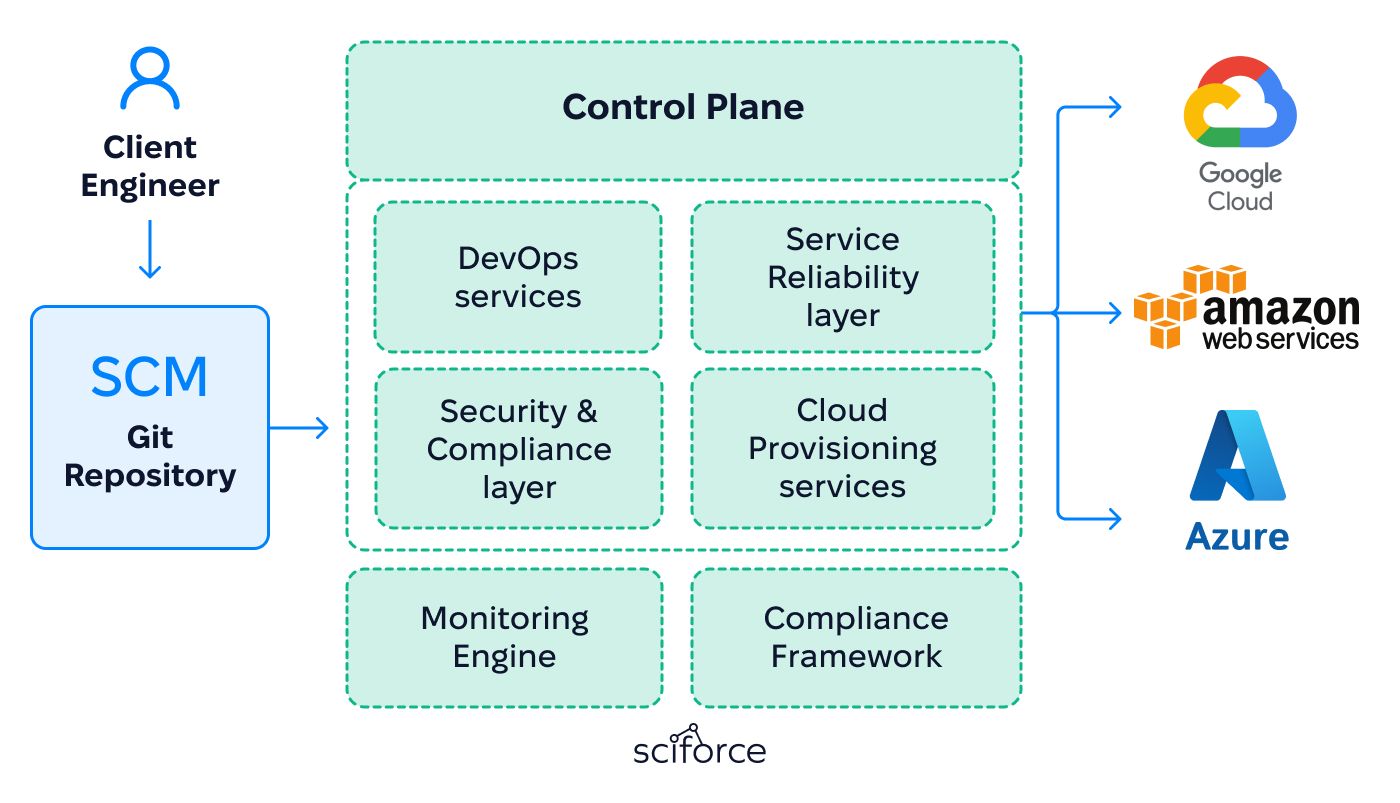
3) Extended сontrolframework
All modules were grouped into categories to handle different layers of the stack:
4) Onboarding automation
Automation scripts were built to check cloud credentials, set up the base environment, and apply starting security policies. This turned what used to take hours of manual work into a fast, repeatable process that reduces mistakes and gives every client a consistent, secure setup.
5) GitOps integration
Infrastructure settings are stored in Git as the single source of truth. The platform checks cloud environments against these definitions, and if someone makes a manual change in Azure or Google Cloud, it detects the difference and automatically restores the approved state.
6) Security and access layer
A centralized policy framework was introduced to unify how authentication and roles are managed across different cloud providers. Instead of handling Azure Active Directory and Google IAM separately, the system mapped them to a single model.
7) Monitoring and analysers
The platform included built-in monitoring tools and analysers to track client's resources and services and flag quota or permission issues. To strengthen reliability and compliance, it also integrated with SIEM (Security Information and Event Management) and CAPM (Cloud Application Performance Monitoring) systems. Together, these provided:
8) Cross-cloud research and testing
The team conducted extensive validation in real Azure and Google Cloud environments to uncover differences in APIs, access models, and resource behavior. This helped uncover issues with resource models and access rules, which were then fixed. As a result, the system runs consistently across both clouds, even when they handle resources in different ways.
Consistent multi-cloud provisioning
Engineers define infrastructure in code, and the platform automatically converts these definitions into the right cloud-native resources across Azure, Google Cloud, and AWS, enabling multi-cloud Kubernetes provisioning with a single configuration. This removes the need to work with different provider APIs and provides one consistent way to deploy and manage clusters, VMs, and services across environments.
Layered automation framework
Each layer is responsible for a specific part of infrastructure management: cloud layer creates clusters, VMs, and databases; security layer enforces common access and policy rules; and reliability layer watches for problems and recover automatically. This makes it easier to run and maintain infrastructure across different providers.
Automated client onboarding
The system includes automation scripts that capture required credentials and configure initial access in Azure and Google Cloud. What previously took hours of manual setup by a DevOps engineer is now a repeatable process, reducing errors and speeding up project start times.
GitOps-driven state management
Infrastructure definitions stored in Git are the single source of truth. The system continuously monitors environments, detects configuration drift (e.g., a cluster changed manually in Azure), and automatically restores it to the approved state, ensuring compliance and stability through GitOps-based drift detection across multiple cloud providers.
Centralized security and access control
Permissions are unified across clouds, with repository-level separation so different departments or teams can manage their infrastructure independently without risking conflicts or unauthorized changes.
Scalability and reliability
The platform makes it easy to spin up or remove resources across multiple providers within minutes. Teams can scale workloads or retire unused resources while ensuring that everything remains aligned with the repository-defined configurations.

1. Spin up the control plane
The process begins with creating a central Kubernetes cluster, used as the management hub for all client environments. In this case, the team used GKE Enterprise for its scalability and reliability to host GitOps controllers and provisioning services. Once the control plane is in place, automation components are deployed to extend Kubernetes with the ability to manage resources in Azure and Google Cloud. Standard components manage common infrastructure, such as clusters, databases, and storage, while custom-built integrations handle organization-specific use cases.
Their health is verified by checking that Custom Resource Definitions (CRDs) are registered and controllers are running correctly, ensuring the control plane is fully ready to connect to client clouds and manage resources as native Kubernetes objects.
2. Intake and validate client credentials
To connect with a client’s cloud account, the platform needs access details that are collected and checked in a consistent way:
This ensures every client is onboarded with the right access, without manual errors.
3. Publish and enforce the schema
Code configuration is introduced so engineers can describe infrastructure the same way across all clouds. It covers resources like clusters, virtual machines, databases, and networks in a consistent format.
The setup includes:
4. Set up GitOps and repo structure
To make Git the single source of truth for infrastructure, each team or tenant gets its own repository to manage configurations. Branch protection rules and CI checks are applied to ensure changes are reviewed and validated before being merged.
These repositories are then connected to unified multi-cloud infrastructure management with GitOps controllers, which watch for updates and automatically apply every approved commit to the control plane.
5. Bootstrap tenant environments
Each client gets a dedicated environment before workloads are deployed. This setup makes sure everything starts clean, secure, and separated:
6. Provision the first stack
To test the system end-to-end, a small set of resources is deployed. This includes:
This confirms that a code definition in Git can be turned into real infrastructure in Azure or Google Cloud.
7. Manage updates and deletions through Git
Once the first stack is running, all future changes follow the same Git-based process:
8. Continuous reconciliation and monitoring
In production, the platform keeps infrastructure stable by constantly comparing the live cloud state with what is defined in Git. If someone makes a manual change in Azure or Google Cloud, the system detects the difference and automatically restores the approved configuration.
At the same time, metrics, logs, and alerts provide visibility into system health, reconciliation errors, and quota or permission issues.
Engineers also rely on runbooks with clear rollback and troubleshooting steps, ensuring they can respond quickly and keep environments aligned with source control.