Chatbots helped businesses get started with AI, but their impact has been limited — they respond to questions, follow scripts, and stop at the conversation. They don’t take action.
AI agents do. These systems can plan, decide, and carry out tasks across tools like CRMs, ERPs, and internal platforms — all with minimal human input. They act more like digital team members than assistants.
Gartner projects that by 2026, 40% of enterprise applications will include task-specific AI agents, up from under 5% in 2025. According to Cloudera, 96% of enterprises are expanding their use of AI agents, especially in operations, analytics, and IT.
This article breaks down what AI agents are, how they differ from traditional chatbots, where they’re already being used, and why they’re becoming essential to the next phase of enterprise automation.
Autonomous AI agents are software systems that set goals, make decisions, and complete tasks across business tools with minimal human involvement. They operate independently, respond to real-time changes, and take action based on triggers, schedules, or incoming data.
These agents can manage multi-step workflows across platforms like CRMs, ERPs, and internal applications. They stay active, adapt to new information, and carry out tasks such as tracking progress, sending updates, or moving work through systems.
With their speed, flexibility, and ability to work across systems, AI agents are becoming a valuable part of how enterprises streamline operations and scale efficiently.
Autonomous AI agents stand out by combining several advanced abilities that allow them to operate across complex enterprise environments. These core capabilities make them well suited for high-impact, repetitive, or time-sensitive tasks:
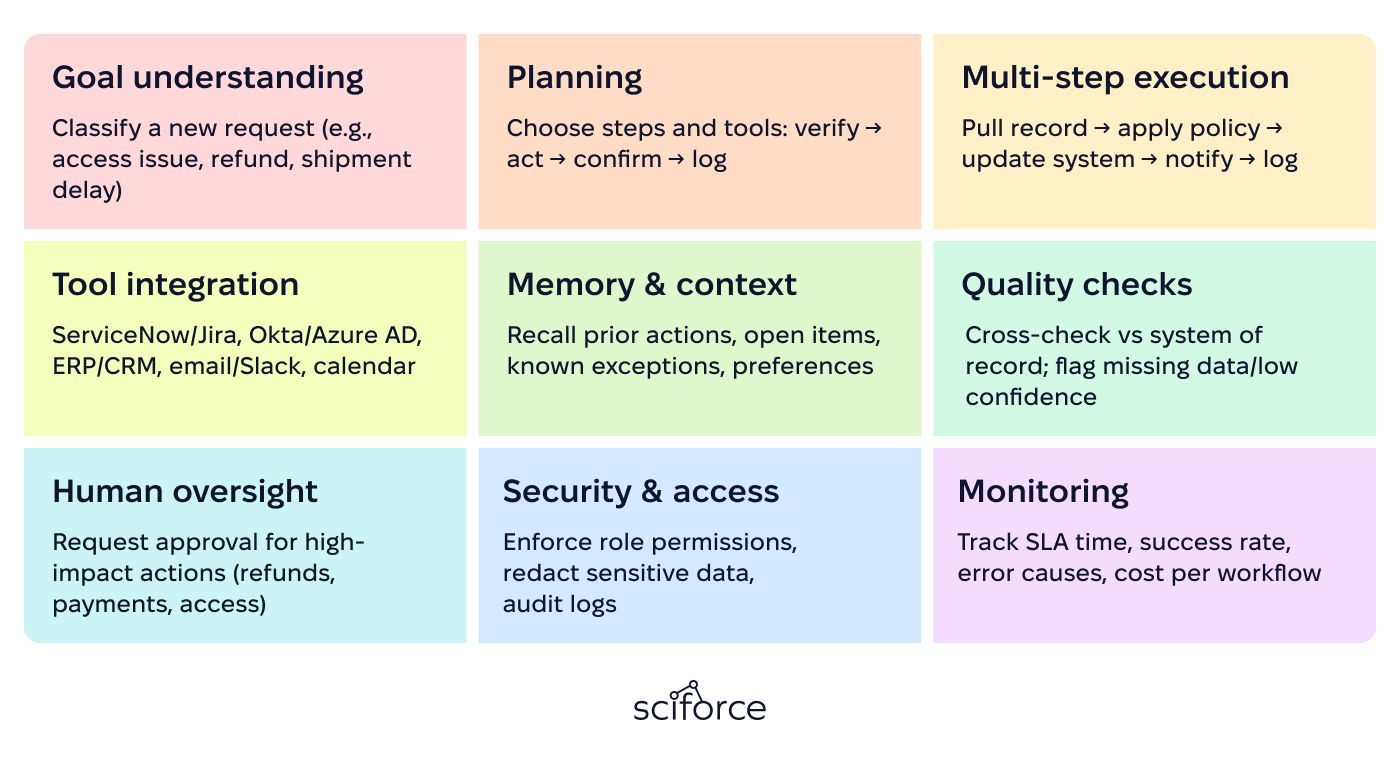
1. Goal understanding: A request comes in (a user message, a system event, or a scheduled trigger). The agent identifies the goal, the objects involved (lead, ticket, invoice, KPI), and the expected output.
2. Planning: It creates a short plan: which steps to run, what data is needed, which tools to use, and what a successful result looks like.
3. Multi-step execution: The agent runs the steps in order. Each step produces an intermediate result that guides the next step until the workflow is complete.
4. Tool integration: It connects to business systems through APIs or connectors to read records, update fields, create tasks, send messages, or trigger automations.
5. Memory & context: It keeps track of what has happened in the workflow and uses relevant history when needed, such as prior actions, open tasks, or preferences.
6. Quality checks: Before sending a final answer or taking an action, it verifies key data points, checks consistency, and flags uncertain results.
7. Human oversight: For higher-risk actions or unclear cases, it pauses and asks for approval or escalates to a person with a clear summary and recommended next steps.
8. Security & access: All actions follow permissions and policy rules. Sensitive data is protected, and key actions are logged for auditing.
9. Monitoring: It records operational metrics such as success rate, speed, tool errors, and cost, so teams can measure performance and improve the system over time.
Together, these capabilities let an agent turn requests or system events into completed work across business tools. It can run tasks step by step, keep context, check results, and escalate unclear cases — while following access rules and tracking performance.
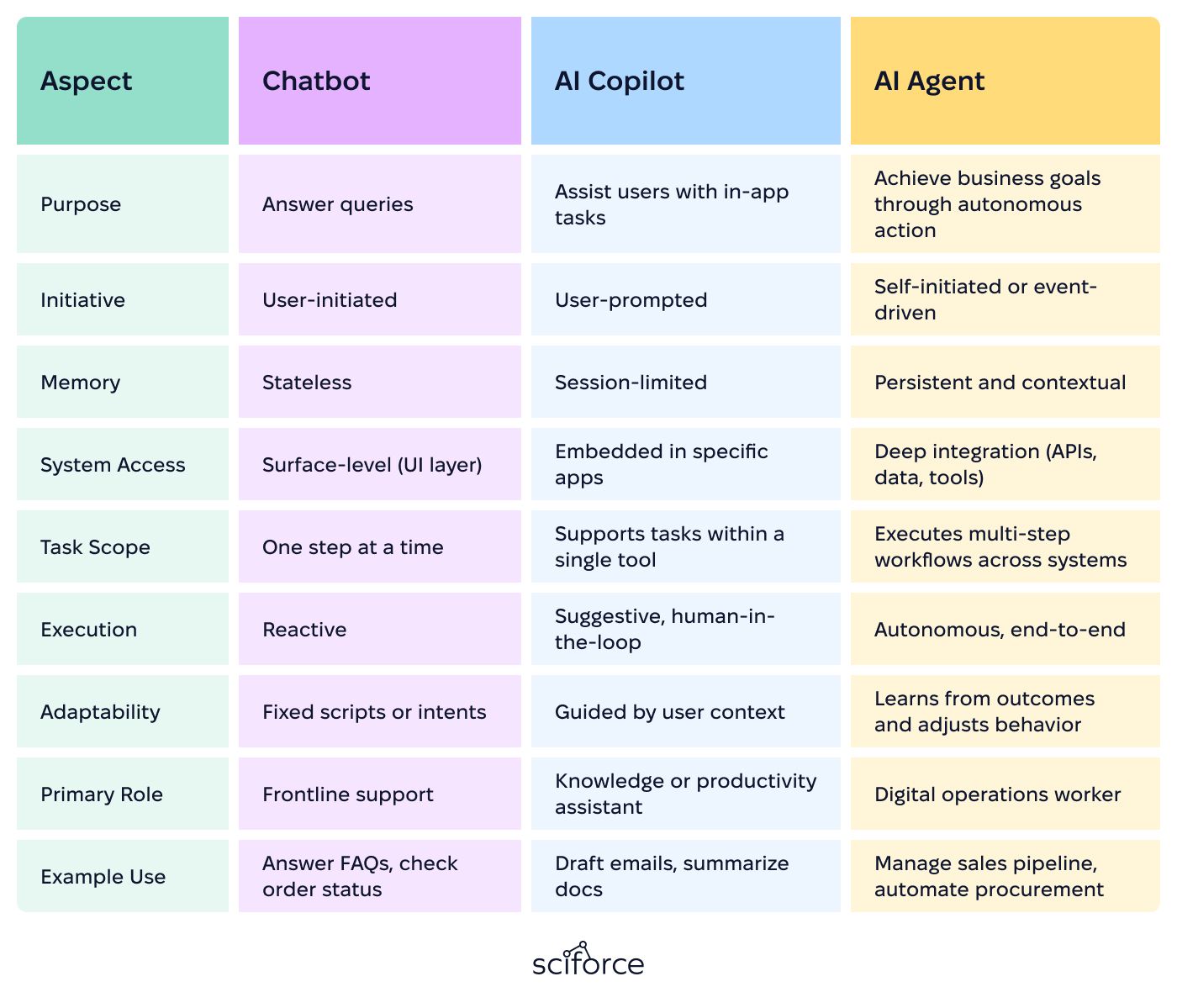
Many organizations began their AI journey with chatbots — simple tools built to handle FAQs, support tickets, and basic customer service tasks. More recently, AI copilots have entered the picture, offering helpful suggestions, content generation, and automation within specific apps like Microsoft 365 or Salesforce. Both have proven useful in supporting productivity and handling repetitive requests. However, their capabilities are limited when it comes to running real business operations:
- Chatbots are designed for short, reactive conversations.
- Copilots provide more intelligent assistance within tools.
While both play a role in improving user experience and reducing task load, they’re ultimately support tools — not autonomous workers. For enterprises aiming to coordinate complex workflows, automate decisions, and scale operations without scaling headcount, AI agents offer the next level of capability.
Many companies are looking for ways to move faster, cut manual work, and handle more complex operations without adding extra staff. Tools like chatbots and basic automation can help with small, routine tasks — but they’re limited when it comes to connecting systems or making decisions. AI agents fill that gap. They run entire workflows from start to finish, work across platforms like CRMs or ERPs, and respond to changes in real time.
Operational efficiency at scale AI agents automate manual, high-volume tasks across departments like finance, IT, HR, and sales — cutting workload and speeding up execution. Organizations report over 60% reduction in manual work when using agents for internal processes. In sales, for example, agents now handle lead follow-up, outreach, and CRM updates that previously required dedicated staff.
Capabilities beyond chatbots and automation Agents manage complex workflows like compliance checks, procurement coordination, and dynamic task routing. Unlike traditional tools, they adapt to changing inputs and operate across systems in real time.
Strategic competitiveness Companies see AI agents as critical to staying agile and efficient. 93% of IT leaders plan to deploy agents by 2025, aiming for faster decisions and better coordination across platforms.
Always-on responsiveness Agents work continuously in the background, reacting instantly to triggers, data changes, and events, helping teams respond faster and avoid delays in areas like support or supply chain.
Enterprise-ready deployment models Adoption is growing fast: 66% of companies are building agents on AI infrastructure platforms like Azure or AWS, while 60% are using agent capabilities already built into platforms like Salesforce or Microsoft Dynamics.
AI agents are moving from pilots to real use in industries where work is complex and heavily process-driven. In many cases, they handle high-volume, multi-step tasks inside business systems, while people oversee exceptions and controls. The examples below show how this is happening in finance, logistics, and healthcare across the US and Europe, followed by the main challenges leaders should plan for before scaling.
Banks are moving beyond basic GenAI assistants toward autonomous, multi-step workflows in onboarding/KYC, back-office accounting, and financial crime operations:
Reuters reports that freight and logistics players including DHL, Ryder, and Flexport are among 70+ enterprise customers using AI agents. These deployments target routine coordination tasks that slow operations down at scale, such as rate negotiation and appointment booking – work that otherwise ties up teams with high-volume calls, emails, and status updates.
Healthcare is starting to use AI agents in areas where automation can be controlled and supervised, such as patient outreach, scheduling, and revenue-cycle operations. Universal Health Services has deployed Hippocratic AI’s agents to make post-discharge follow-up calls, with escalation to staff when needed. In the UK, Somerset NHS Foundation Trust reports that an outpatient booking virtual assistant is projected to save 600 staff hours per week and £456,000 per year at target adoption. McKinsey also estimates that agent-driven revenue-cycle workflows could cut providers’ cost to collect by 30–60% by automating steps like eligibility checks, denials handling, and follow-ups under governance.
AI agents can bring major improvements to how businesses work, but there are also challenges to consider before rolling them out. A recent Cloudera report (2025) shows that the top concerns for companies are data privacy (53%), connecting with older systems (40%), and high setup costs (39%). These are valid concerns — but with the right preparation around systems, oversight, and team support, businesses can manage the risks and get strong results from using agents.
Right now, only 27% of organizations fully trust AI agents. For agents to take action safely, companies need ways to review, explain, and control what the agent does. Adding human checks, alerts, and clear logs helps build confidence — especially in industries with strict rules.
Many older systems weren’t built to work with AI agents. Without the right APIs or data access, agents can’t do their job. Companies need to assess where updates are needed and make sure tools can connect and share data reliably.
As agents take over repetitive tasks, people’s roles shift toward supervising, reviewing, and improving outcomes. This brings new KPIs and the need for training. Teams should prepare for new workflows and invest in skills that support working alongside AI.
Rules like GDPR and the upcoming EU AI Act require companies to keep AI decisions clear, fair, and traceable. It’s important to build in ways to monitor agent behavior, explain results, and follow local regulations.
A multi-industry enterprise performance management provider built an AI-enabled platform to centralize business metrics and improve decision-making. In practice, the product interprets user goals (e.g., “why did hiring slow down?”), retrieves the right data across systems, applies policy controls, and returns validated outputs as summaries, reports, or alerts.
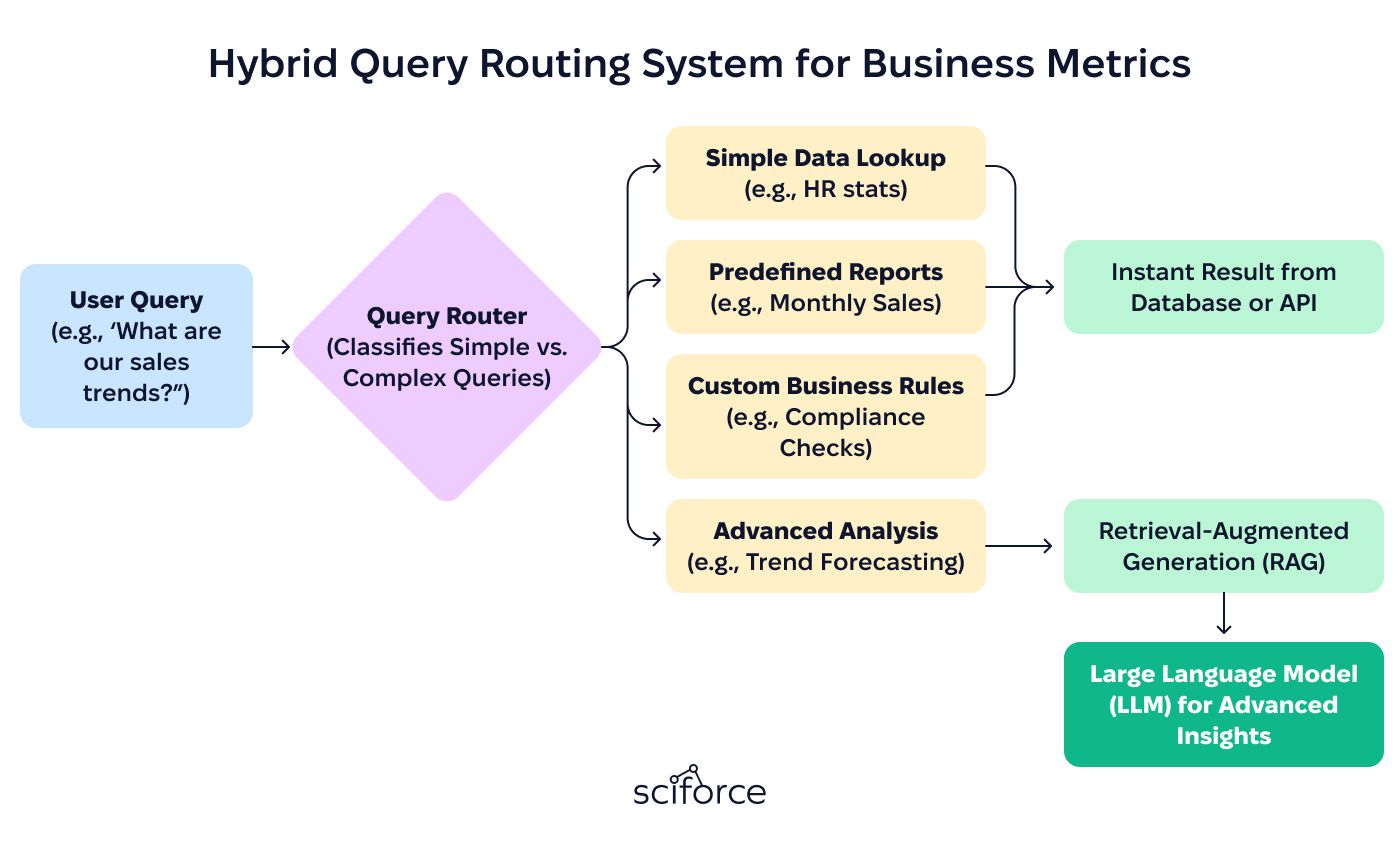
The client’s constraints were mainly about reliable execution across systems:
SciForce redesigned the legacy Rasa-based chatbot into an intelligent execution workflow that combines orchestration, tool use, and controls:
The redesigned system delivered measurable improvements in execution efficiency, reliability, and trust:
For most organizations, the opportunity with AI agents is simple: faster execution across the systems where work already happens. Start with one workflow that repeats daily, define guardrails and escalation rules, and measure impact with a short scorecard: time saved, cost per case, error rate, and adoption. Once the numbers hold, scaling becomes a business decision, not a technical debate.
Which workflow would you want to automate first – and what result would make the pilot a clear win?